
Closed beta available now
SynchresisVM: desktop and server virtualization
SynchresisVM Server runs your virtual machines on one server or across a cluster, with management in your browser. Single-server use is free forever.
Free native apps for Windows, Linux and macOS run every Server VM type on your desktop and can also connect to Server.
Server and desktop apps are available now in closed beta. We’ll install Server and provide the apps on a free call. Desktop-only demos are welcome too.
Every Server VM type, on your desktop
Every VM type SynchresisVM Server runs is also available in our native Windows, Linux and macOS apps. Create and run VMs directly on your computer, or use the app as a client for a remote SynchresisVM Server.
The desktop apps are included in closed beta and available now. We provide them on your free installation call. Prefer to start with just the apps? Book a free desktop demo and we’ll provide the apps and show you around. You can evaluate Server whenever you’re ready.
The apps are free forever; clustering is priced separately. Available virtualization and emulation backends depend on the host operating system. KVM provides acceleration on Linux; bhyve is our default on FreeBSD, where QEMU is also included for software emulation.
Choose your Server installation
| Distribution | Platforms | Installation and support |
|---|---|---|
| Self-contained installation ISO | FreeBSD, recommended; or Debian 13 | Install SynchresisVM Server and its operating system together. |
| Packaged installation | Debian 13 or the latest stable FreeBSD release | Fully supported packages for your existing operating system. |
| macOS Server builds | Intel and ARM64 | Considered stable; use at your own risk. Engineering support is available, including free single-server beta support. Every emulation backend except bhyve is available on both architectures. |
| Windows Server build | x86_64 | Use at your own risk; not regularly tested. Engineering support is available, including free single-server beta support. A Windows ARM64 Server build is not available. |
Every SynchresisVM Server installation is a first-class cluster node, regardless of CPU architecture or manufacturer. Routine maintenance and testing differ by build; engineering support is available for all of them. See free beta support and paid support options.
Both the FreeBSD ISO and packaged install include the full QEMU suite alongside bhyve. We make bhyve the default for hardware-assisted virtualization; QEMU’s TCG provides software emulation for workloads that need it. Explore the options for older software.
Our FreeBSD distributions include bhyve patches for VM suspend/resume and live migration while the VM remains running. For bhyve, this includes compatible hosts from the same CPU manufacturer across generations. Across SynchresisVM, live migration between different processors is available wherever the backend, VM CPU configuration, supported devices and participating hosts permit.
Free desktop apps. A free call to get started.
The native desktop apps are available now in closed beta. We provide them on your free call, with a desktop demo or a Server installation. Apps and single-server use are free forever. Installation calls are free throughout closed beta and for the first few months after 1.0. No purchase required.
Free forever
Desktop apps and single-server use stay free, including the official 1.0 release.
Start with apps or Server
We provide the desktop apps and show you around. If you want Server too, we install it with you on one machine.
Talk to the people building it
Get direct developer access and free single-server support during closed beta. Beta participants keep that support free for 90 days after closed beta ends, without an SLA by default. See support options.
We believe the product will earn your recommendation. See for yourself. Book your free beta call, or ask us to get in touch.
Built for the people who have to keep it running
SynchresisVM is a general-purpose virtualization, hypervisor-management and multiplatform computer-emulation platform from Synchresis Solutions. It is available as native desktop apps and as SynchresisVM Server, with a browser interface and API for Server management.
We built SynchresisVM for our own engineers: the people responsible for deployments, maintenance and the next unexpected problem. The beta brings you into that conversation. Work directly with the developers and tell us where the platform needs to get better.
Planning a new deployment or a migration from VMware, Hyper-V or Proxmox? Start with the workloads, storage, networking, backup tools and operating procedures you need to support. Evaluate SynchresisVM against those requirements in a representative pilot.
Closed beta, already running our own production workloads. Our internal production deployment has been running for 6+ months, supporting nearly 200 VMs with observed uptime above 99.9%. The closed beta is available now, with direct developer access. See the introductory installation-call offer. We’ll help you evaluate it with your own workloads.
What you can explore in the beta
Host and backend choice
bhyve is the FreeBSD default, with QEMU included for emulation. Use KVM acceleration on Linux, or choose another backend for your workload. See the Server distributions and support status.
Management in your browser
Work with virtual machines, consoles, hosts, storage and networks through the web interface. API operations provide a route into your own automation.
A cluster starts with two servers
SynchresisVM supports two-server clustering without a rigid-quorum requirement. Use NFS or NVMe-oF shared storage, or keep local disks and use shared-nothing live migration for core x86 and x86_64 VMs.
Backups you can inspect
Scheduled backups and retention use archives containing VM configuration and disk images. Test restoration and application consistency as part of your evaluation.
Workload visibility
Inspect per-VM resource usage and host capacity when sizing a pilot. Telemetry and available measurements vary with the host and backend.
Migration built in
Bring workloads from VMware ESXi, Proxmox and Microsoft Hyper-V, including Windows Failover Clusters. Evaluate guest requirements and rehearse your cutover with the migration tooling.
Live migration, with or without shared storage
SynchresisVM Server supports shared storage over NFS and NVMe over Fabrics (NVMe-oF).
All core x86 and x86_64 VM types also support shared-nothing live migration: move a running VM and its disks between SynchresisVM hosts using local storage. You can migrate live without a shared-storage system.
Performance you can measure. Capacity you can use.
bhyve on FreeBSD
bhyve is our default on FreeBSD for hardware-assisted virtualization, with VirtIO and NVMe devices. The included QEMU suite provides software emulation for workloads that need a different approach.
“Sane overcommit”
For most VM types, host memory is backed as guest pages are used. Configurable overcommit helps you make better use of underused allocations, with headroom for the host and workload peaks.
Test the density you actually need
Use configured RAM and resident-usage views together. Set overcommit and headroom for the workload, then test peak demand, application latency, storage I/O and recovery under load.
Bring a representative workload from Hyper-V, VMware or Proxmox and compare it on equivalent hardware. We will help you test the behavior that matters to your environment. Performance depends on the workload, drivers, storage and host configuration.
Memory behavior varies by VM type and configuration; passthrough and wired-memory settings can change it. FreeBSD documents bhyve hardware-assisted virtualization and its memory and device options.
See the software
Actual SynchresisVM screens: VM and host management, cluster operations, backups, migration and networking.
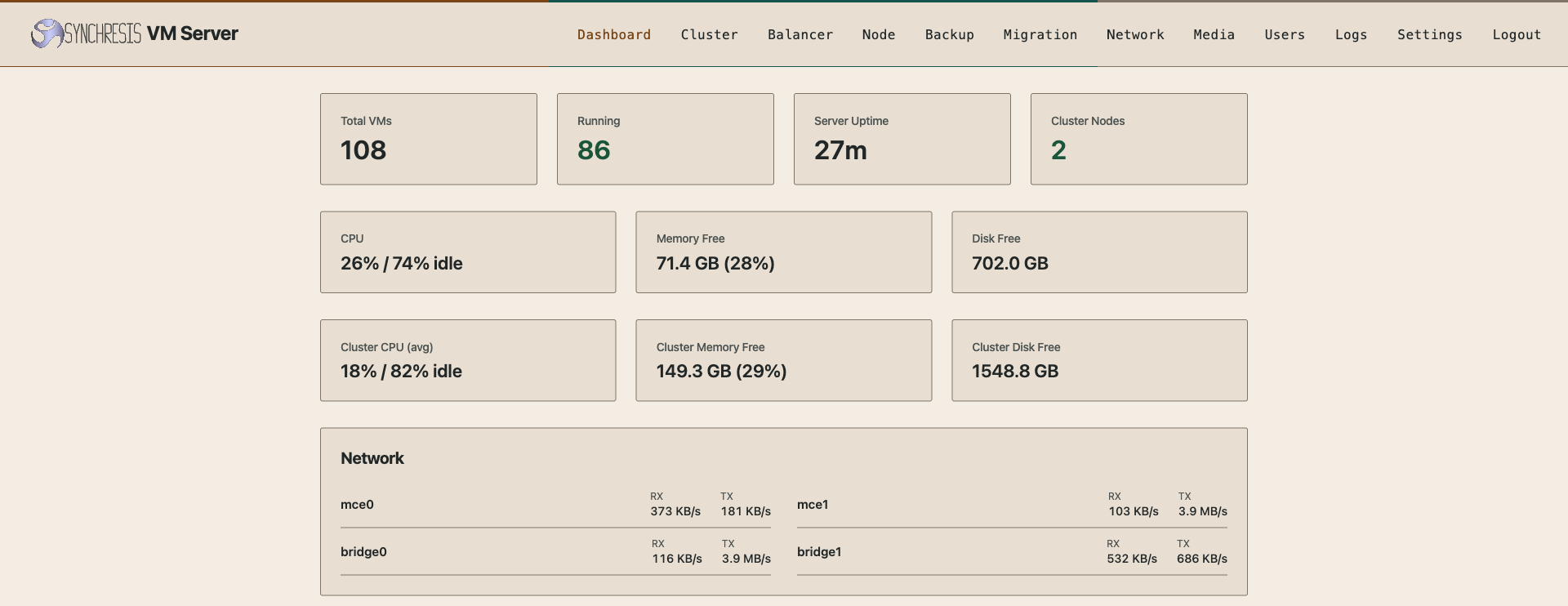
Dashboard
Cluster-wide CPU, memory and disk usage, VM counts and live network throughput.
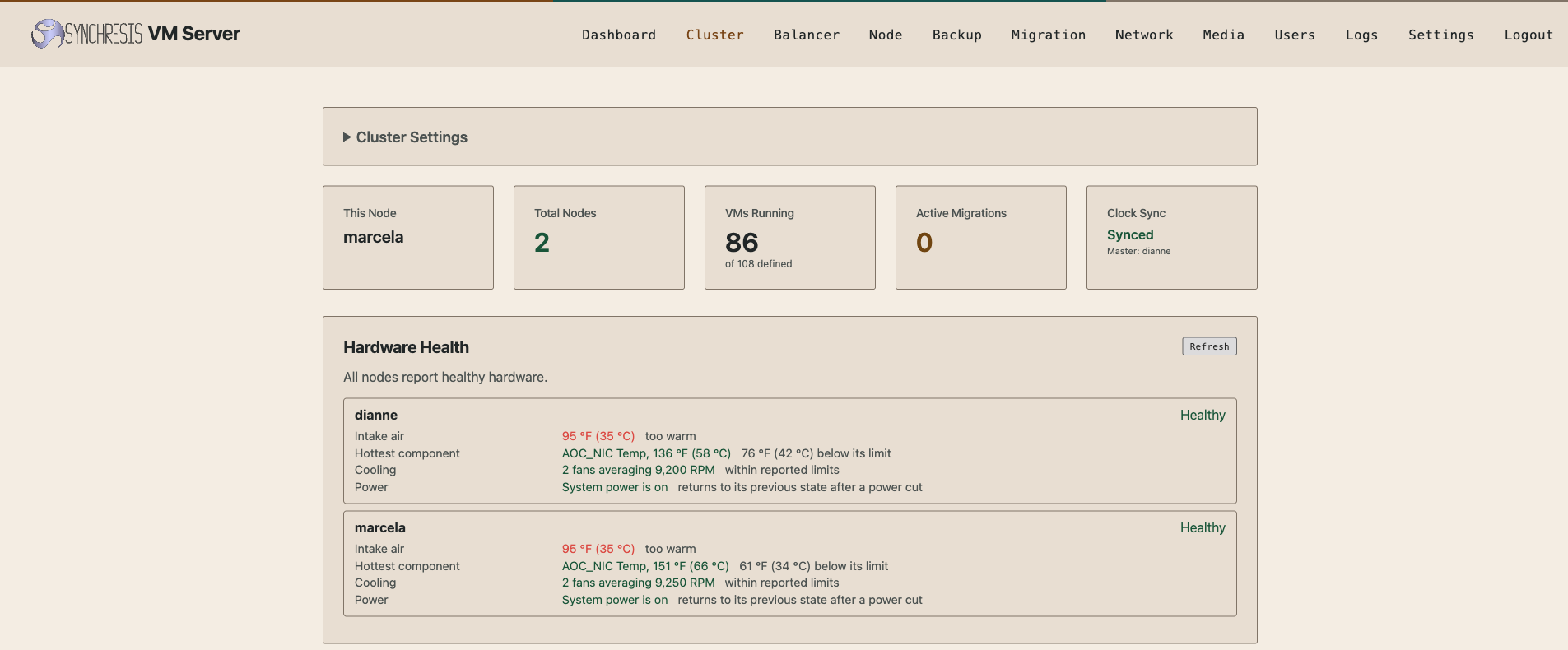
Cluster
Per-node hardware health: temperatures, fans, RAID and power state.
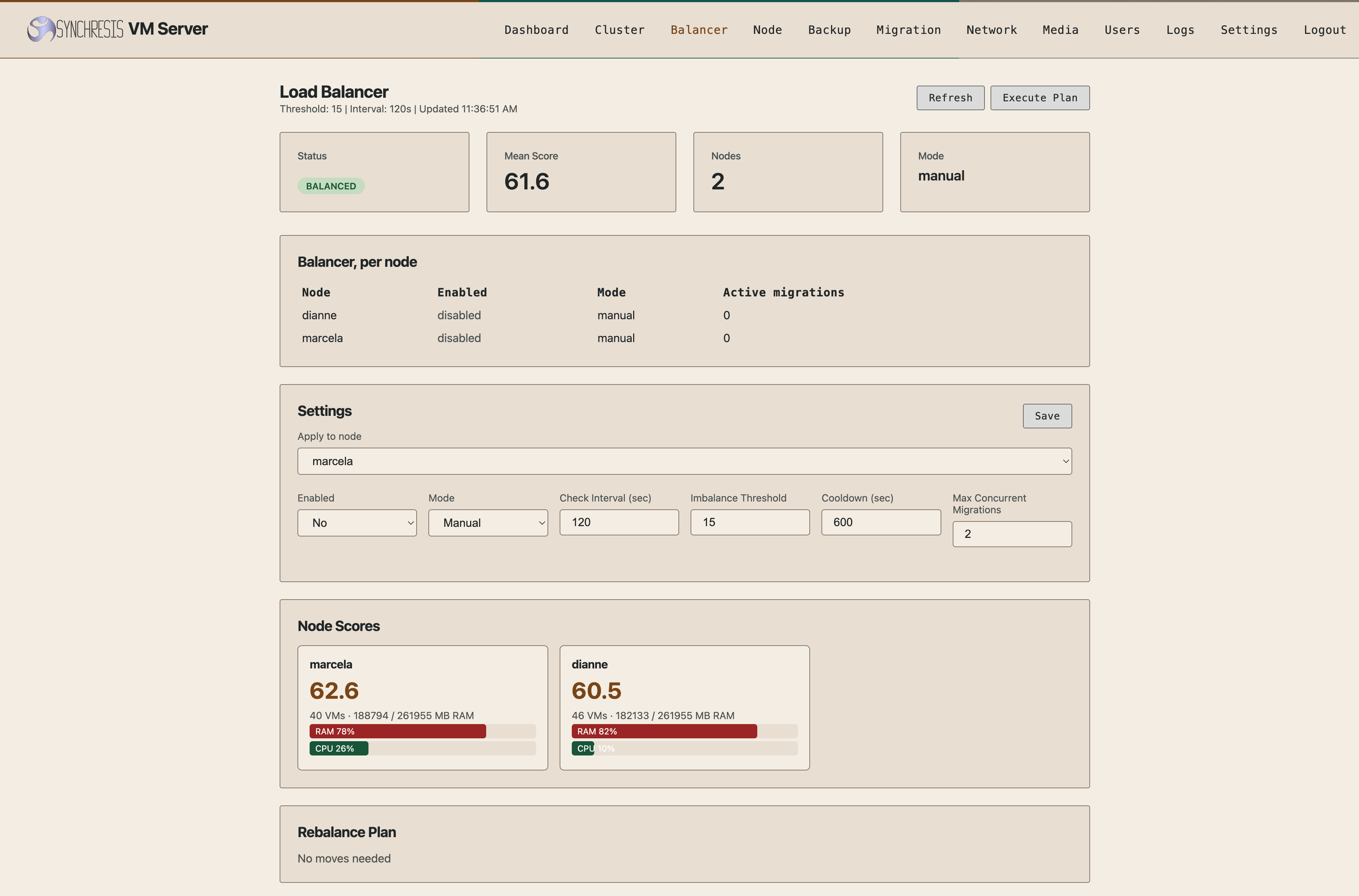
Load balancer
Scores each node and proposes migrations, manually or automatically.
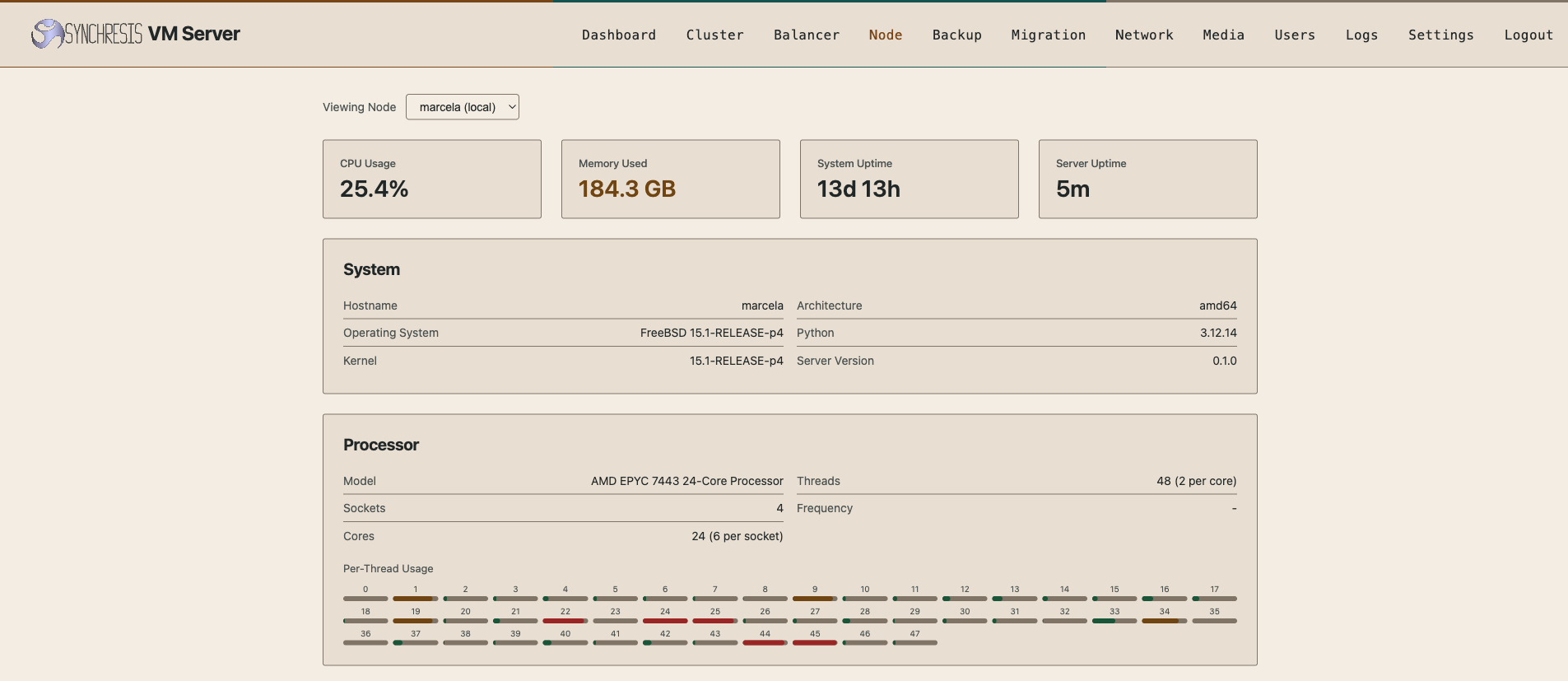
Node
Per-thread CPU usage and system detail for a single host.
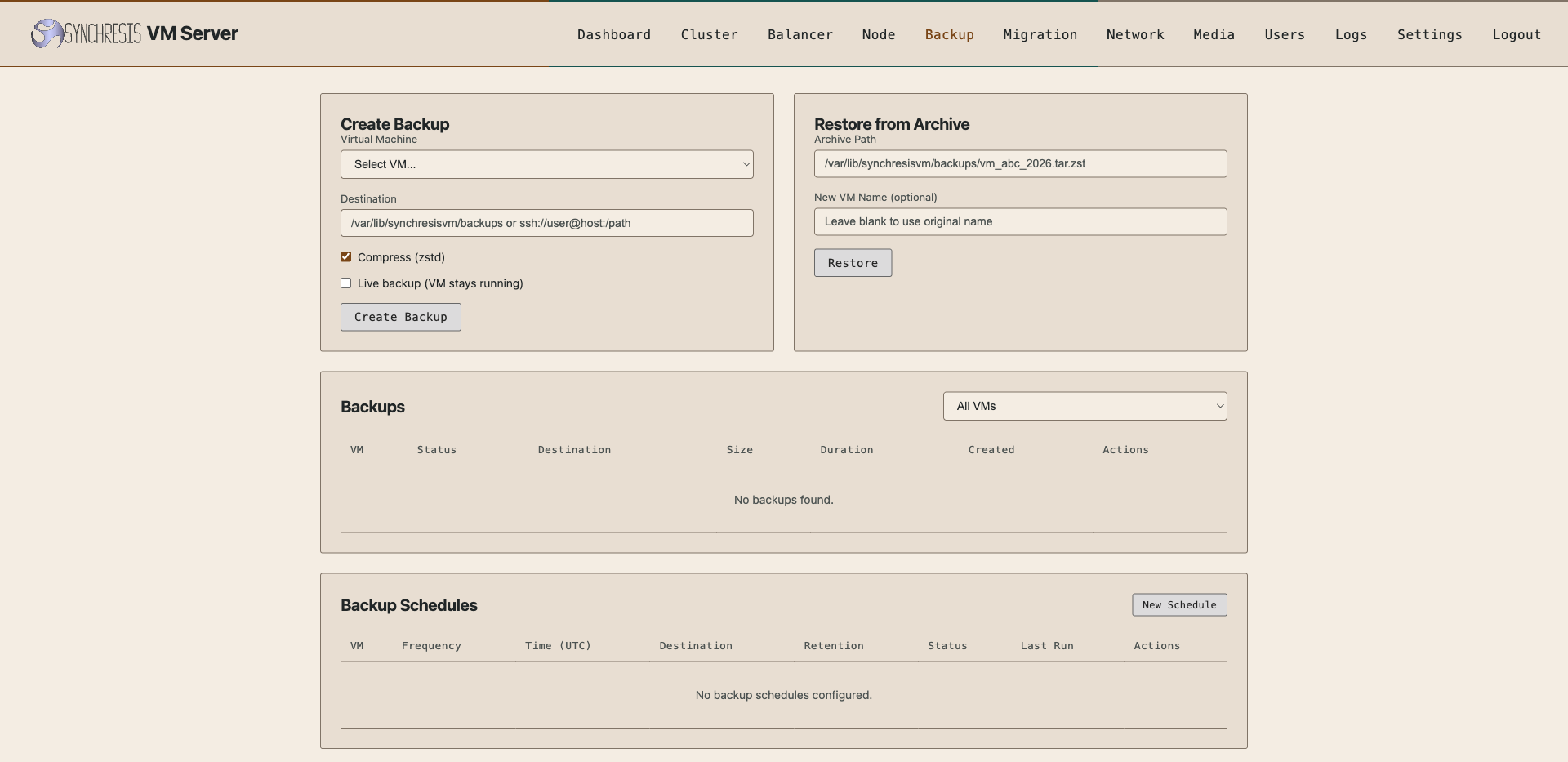
Backup
Backup interface with on-demand and scheduled operations. Validate the backup mode and restore procedure for your guest and backend.
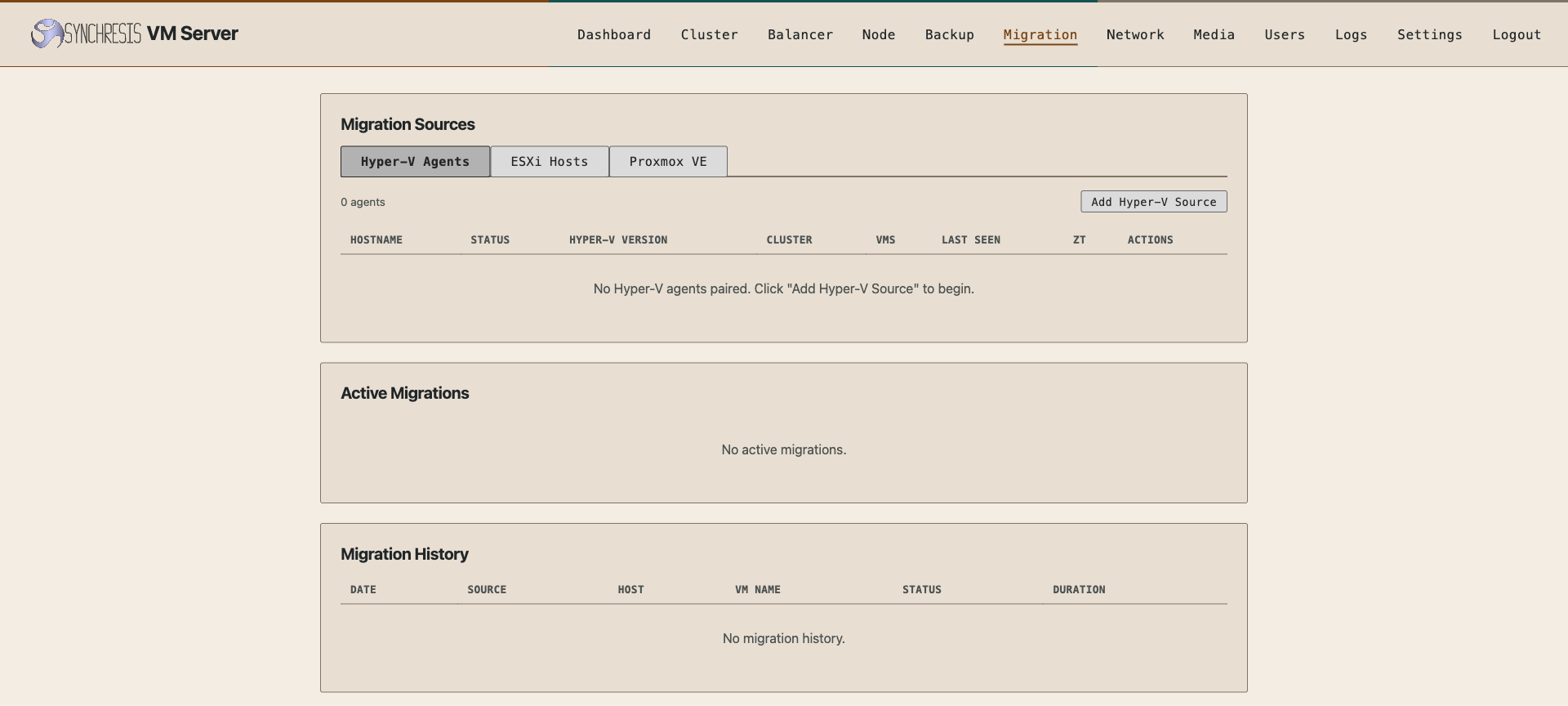
Migration
Migration interface for evaluating moves from Hyper-V, ESXi and Proxmox. Plan and test the guest configuration, disk transfer and downtime.
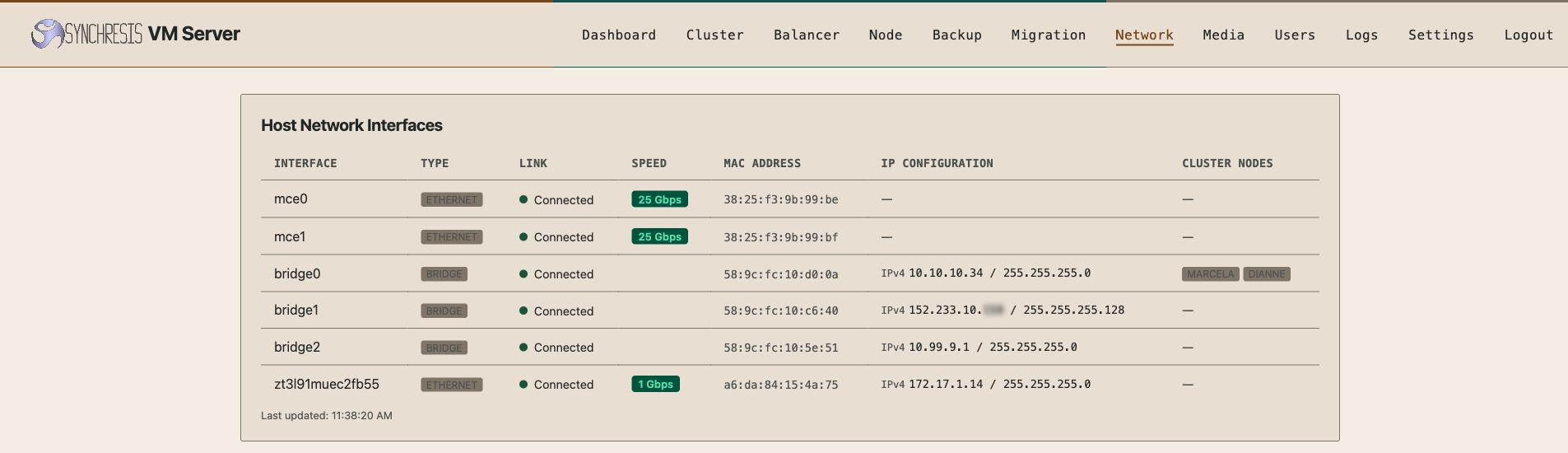
Network
Physical interfaces, link speed and which bridges carry the cluster.
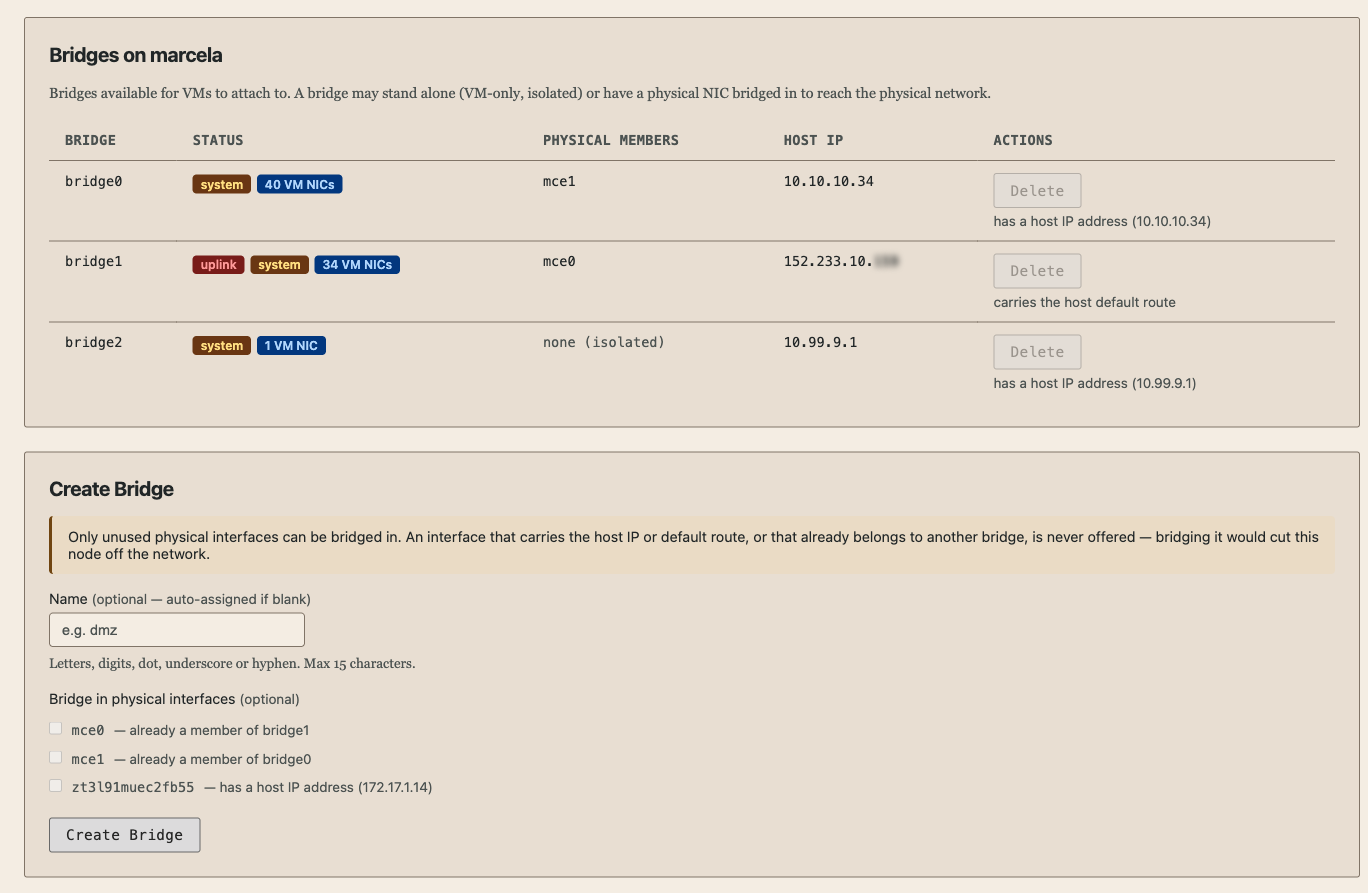
Bridges
Network bridge management. Validate network changes and host connectivity before applying them.
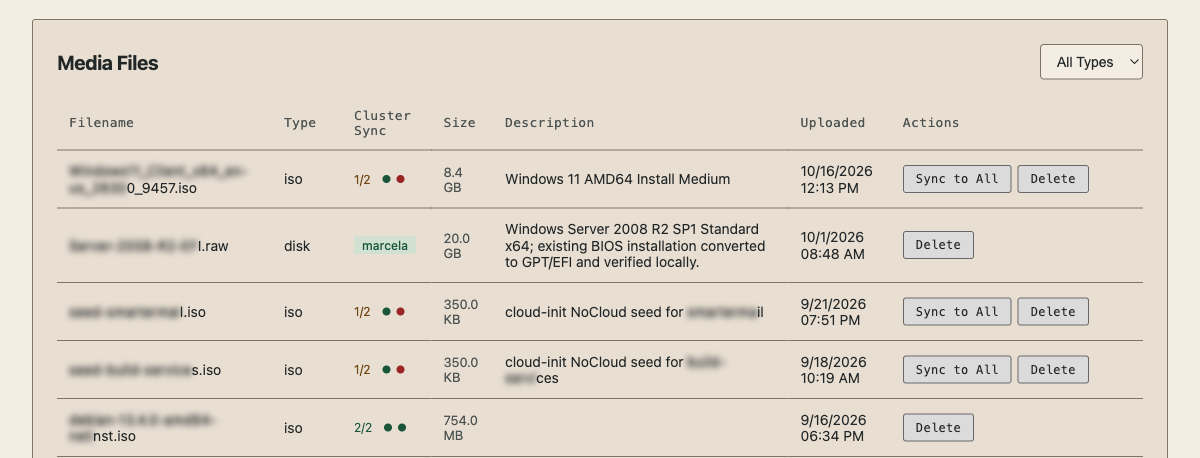
Media
Media library for installation images and VM disks.
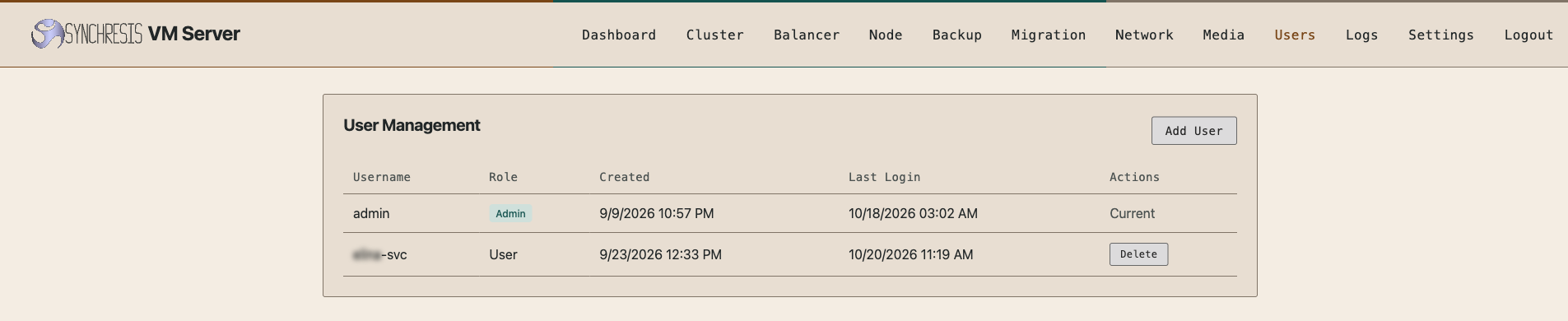
Users
Local accounts and roles.
Straightforward pricing from desktop to cluster
Desktop apps & single server
Free forever
Native desktop apps and SynchresisVM Server on one server, including the official 1.0 release.
Clustering
$295 / server / year
Two-server minimum. Includes unlimited support from the developers for the licensed term. Two servers: $590/year.
White-glove migration
$15 / VM
We migrate your workloads, target minimal downtime and test after each VM's first boot.
We’re happy to demonstrate clustering at no charge on your installation call. We may agree a free trial of a small cluster for the duration of closed beta, case by case. Published cluster prices apply unless we agree a trial with you.
Clustering requires active licences and online validation, except for air-gapped arrangements agreed with us. If payments lapse, workloads keep running on standalone hosts; balancing, migration between hosts and other cluster operations are unavailable until payment is resolved. Read the cluster licence terms.
Installation calls are free throughout closed beta and for the first few months after 1.0. You also get direct developer access.
Support from the engineers who build it
Single-server support
Single-server support is included free during closed beta, without an SLA by default. As a thank-you for taking part, beta participants keep free single-server support for 90 days after closed beta ends.
After closed beta, all single-server users can purchase per-incident support, billed at a preferential hourly rate lower than our general expert-support rate. See single-server support options.
Cluster support and SLAs
Cluster licences include unlimited engineering support for the licensed duration. Included support has no SLA; our target is to have an engineer working on your issue within four hours.
Tighter SLAs are available for an annual fee, with commitments down to 15 minutes to an experienced VM infrastructure engineer working directly on your issue during our main working hours: Monday–Friday, 8 a.m.–8 p.m. US Eastern.
That always means an engineer who regularly solves VM infrastructure problems and has restored service through serious production outages. You work directly with the person diagnosing and fixing the problem.
An optional contract can lock in your annual price. Talk to us about an SLA.
Build a decision your team can defend
1. Define the must-haves
List guest versions, storage, network dependencies, recovery targets and essential integrations. Allow time for representative testing and a planned deployment.
2. Prove a representative workload
Agree the evaluation scope. Test boot, application behavior, performance, backup and restore, monitoring and operator access before expanding the pilot.
3. Rehearse the move and the return
Document downtime, ownership, a rollback trigger and data reconciliation. Use the evidence to decide whether, when and where SynchresisVM fits.
Planning a migration from VMware · VMware migration checklist · Download the evaluation worksheet
Older software still has a job to do
QEMU gives older guest operating systems a place to run, including workloads that predate Windows Server 2008 R2. For software tied more closely to period hardware, we also offer 86Box: full-system emulation of older PCs, with BIOS support and period graphics adapters. That can matter for legacy CAD and other applications built around a particular machine.
SynchresisVM also supports emulation across CPU architectures. Bring us an older workload on your installation call and we’ll help choose the appropriate backend.
SynchresisVM does not bundle proprietary firmware. If a workload needs proprietary BIOS or device firmware, you must obtain it separately.
Questions about compatibility and migration
Is SynchresisVM available now?
Yes, including the native desktop apps for Windows, Linux and macOS. We provide the apps on a free call for a desktop demo or Server installation. You can start with the apps and evaluate Server later. Book your free beta call, or leave your name and email in the beta form. For form requests, we usually confirm an appointment within an hour or two during Monday–Friday, 8 a.m.–8 p.m. US Eastern.
Do the desktop apps need a separate Server installation?
No. You can create and run VMs directly in the desktop apps, with the same choice of VM types as SynchresisVM Server. Connecting to a remote Server is optional. If you want a Server installation, choose from the ISO, packages and platform-specific builds above.
How do we plan for our VMware compatibility requirements?
That is a question for a workload-specific evaluation. List the vSphere features and adjacent products you use, including HA, DRS, vMotion, vSAN, NSX and backup integrations. Establish what your target design needs and verify each requirement in the pilot.
How would we move VMware workloads?
Built-in migration covers VMware ESXi, Proxmox and Hyper-V, including Windows Failover Clusters managed through Failover Cluster Manager. Confirm your source version, disks, firmware, guest drivers and networking before a test move. Plan a maintenance window and a tested rollback path; a successful disk conversion alone does not establish application readiness.
Does KVM support mean our existing backup tool will work?
Compatibility must be established for the specific product, version and integration. Include backup, replication, security, identity and monitoring dependencies in your request. Test restoration, not just backup creation.
What is free, and what happens after the installation call?
The native desktop apps and single-server use are free forever, including the official 1.0 release. Installation calls are free throughout closed beta and for the first few months after 1.0. We provide the desktop apps on your free call and, if you want Server, install it with you on one machine. You can book a call just for the apps and evaluate Server later. You get direct access to the developers for questions and feedback. Single-server support is included free during beta; see the 90-day extension and later support options. Clustering is $295 per server per year, with a two-server minimum, and includes unlimited engineering support for the licensed term; see our support target and SLA options. White-glove workload migration is a separate $15-per-VM service. For help with your current platform while you assess alternatives, independent virtualization support is available separately, including 24×7×365 support without a mandatory ongoing contract.
Can I try clustering?
We’re happy to demonstrate clustering at no charge on your installation call. We may agree a free trial of a small cluster for the duration of closed beta, case by case. A trial needs to be agreed with us; otherwise, published cluster licence prices apply.
Who can request access?
IT teams, service providers, independent administrators and individual evaluators can request access. Leave your name and email to get started. You are welcome whether you want just the desktop apps, a single server or a cluster.
Try it with the people who built it
Get the native desktop apps on a free call, with a demo or a Server installation. The apps are available now in closed beta; you can evaluate Server later. Installation calls are free throughout closed beta and for the first few months after 1.0. Book a time, or leave your name and email and we’ll get in touch.
Closed beta available now. Desktop apps and single-server use stay free through 1.0 and beyond. Beta participants get direct developer access.